YET6956WFR-V4.0 WiFi To Remote RF Converter
YET6956WFRV4.0 is a Wi-Fi/Bluetooth remote control signal transponder.
It supports fixed code, learning code and most brands of remote control, support SUB-1G a variety of remote control frequency band (240MHz - 930MHz).This product makes it possible for mobile phone terminal to control remote control equipment.You do not need to press a real remote control to open doors after you add it into your mobile phone.

The YET6956-V4.0 converter supports multiple brands of remote control,and generates remote control directly through the APP brand selection list. Unknown brands can identify and add brand remote control through custom methods.
The remote management is simple: One converter device can match various controllers with different brands, and the APP can delete and rename different brands of remote controllers.
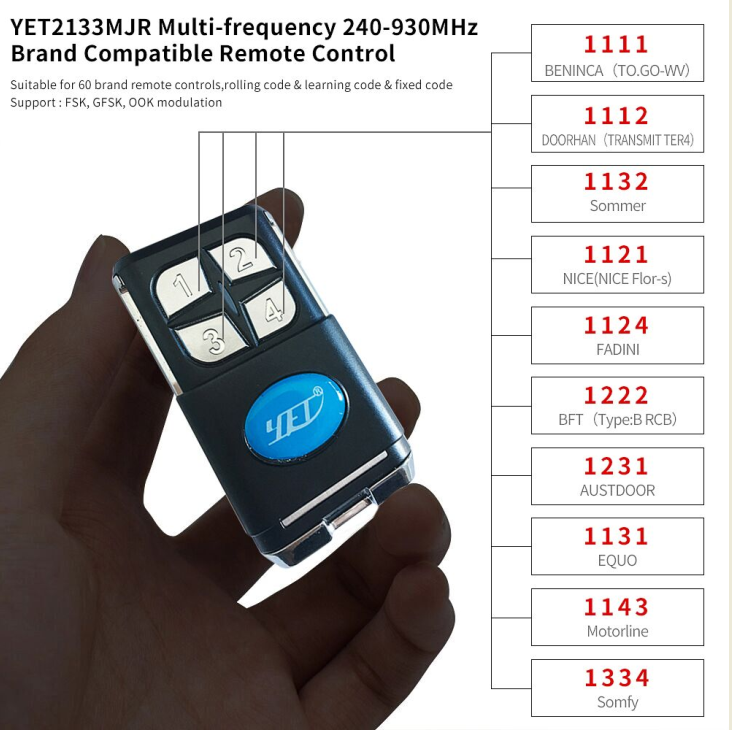
Parts of compatible brands list is as follows.
Support the model, frequency and speed of the remote control brand.
(some brands remote control have no oscillation resistance)

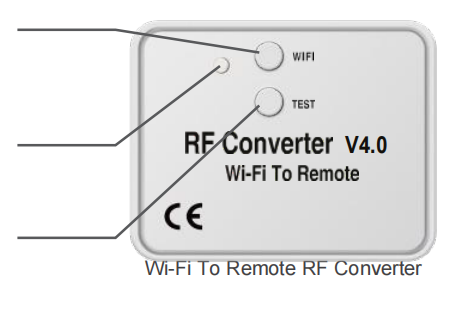
Product Description
Short light : touch button Wi-Fi three times to enter the network access status ( the green indicator flashes quickly )
Indicator light (connect internet / power / operation status indicator )
TEST button ( turn on recognition if need to add a remote control to support )

APP instruction
APP Software Download And Installation:
Android System:
Users can search for keywords through the "Anzhi Application Market" platform: " Home Safemate ", download the latest version of " Home Safemate " software, follow the prompts to complete the installation of the APP software;
IOS system:
Users can search for keywords through the “App Store” platform: “Home Safemate”, download the latest version of “Home Safemate” software, and follow the prompts to complete the installation of the APP software.
Users can also download and install by scanning the QR code
(To install and use the APP for the first time, you need to sign up for the account and then sign in with a successful registered account. Have an account to login directly)
Add remote control:
After adding the RF converter successful, add remote control steps are as follows: click Add Remote Control- > Enter remote controller name - > select remote control brands (some remote control brands need to set frequency, oscillation resistance,address bit encoding) - > click next.
Add A custom remote control
Click Add remote control-> Enter remote control name -> Select Custom (When the RF converter rings one time,press and hold any button on the remote control and close to the RF converter until the RF converter rings three times,indicating that the remote control is successfully added. If the RF converter makes a long beep, the remote control copy failed.) -> click Next .( If the fixed code and the learning code remote control are required, repeat the above steps to add the required buttons one by one.)
Delete the remote control
Click the icon on the top right corner on remote control page - >delete the remote control.
Okay,above are the details of YET6956-V4.0 Wifi to remote RF converter I would like to share with you.If you still have questions about this device after reading my introduction,please feel free to contact us to get more information.If you are interested in this Wi-Fi/Bluetooth remote control signal transponder,please do not hesitate to place an order of it.
Promotion!! Adjustable Battery Infrared Beam Sensor YET610C
Introduction to 2-way controller, 4-way controller, and WiFi controller YET402PC-V2.0
Related Article